Google Pixel 8a - Long Term, REAL WORLD Review!
The Pixel 8A was announced on May the 7th, 2024, and I pre-ordered the phone and received it on the 14th of May. So, I've now been using this phone every day for nearly 3 months. In this video, I'm going to give you my real-world experience of using the phone, and I'm going to closely compare it to its bigger brother, the Pixel 8, because these two phones share a lot of the same features and aren't that far apart in terms of their price. Despite the similarity with the Pixel 8, I've still got a lot to say about the Pixel 8A, so let's crack on.
Unboxing Experience
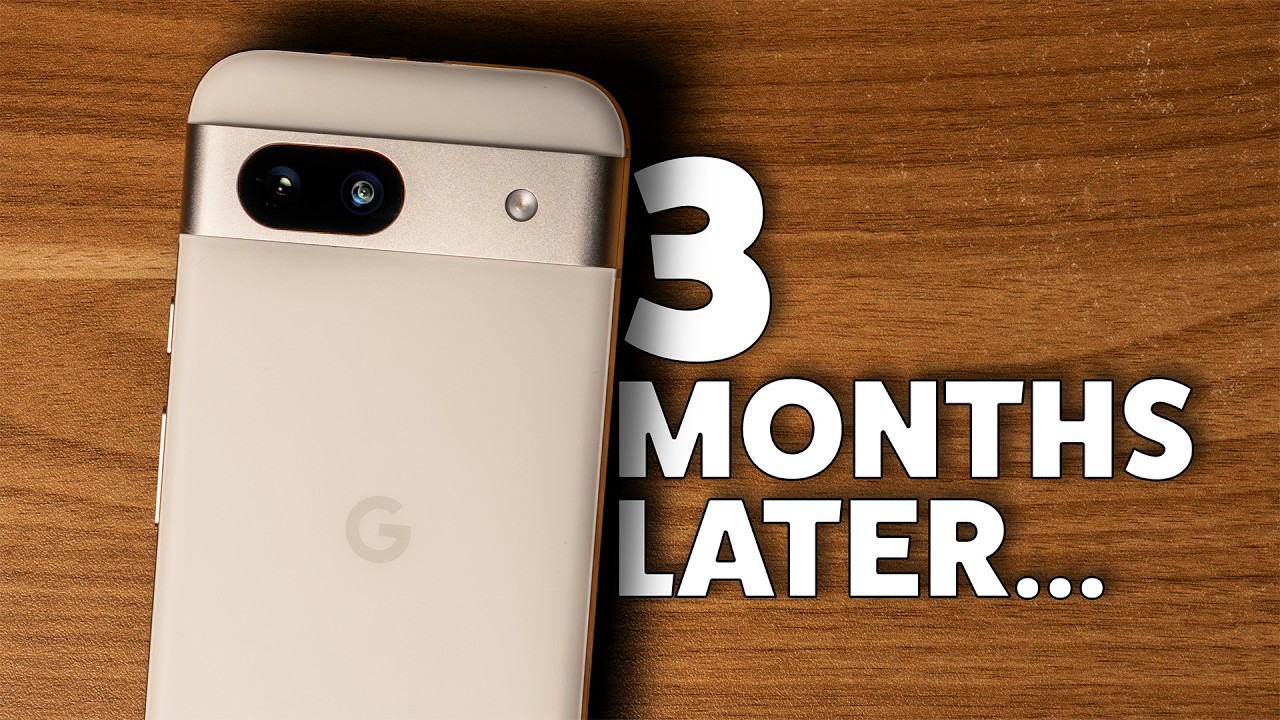
Firstly, the unboxing experience is pretty simple. I picked up one of Google's official Pixel 8A cases in Coral. In the Pixel 8A box, you get the phone itself; I went with the porcelain, kind of off-white color. This is followed by a USB 2.0 USB-C to USB-C cable for charging, a USB-A to USB-C adapter, a SIM ejector tool, and some paperwork.
Design and Build Quality
Now, I'm going to compare my first impressions of the phone to my experience after 3 months because when I first used this phone, I just passed about 6 months of using the more expensive Pixel 8. So, it's the perfect opportunity to compare it to that phone while the experience was fresh in my mind.
Back and Sides
The first thing that stood out to me was the design of the back and sides of the Pixel 8A. I actually slightly preferred this to the Pixel 8, as the matte plastic composite back of the 8A made it both more comfortable to hold but also basically immune to fingerprints on the back—something that really irks me about the Pixel 8. The material on the back of the phone feels super smooth but not super slippy, which is great if you tend to use your phone without a case, and the rounded corners of the phone add to the comfort factor when you're holding the phone in your hand.
The Official Case
Speaking of cases, though, my initial impressions of the official case for the Pixel 8A from Google were not great compared to the Pixel 8 case, which I reviewed positively. The 8A case felt very slippery in the hand and didn't have any sort of soft-touch material on the inside, and the buttons felt quite mushy. However, after 3 months of use, the case has almost gained a bit of a patina, which has weirdly made it more grippy, and the buttons on the case seem to have almost broken in and feel super clicky now. I'm not really sure why this has happened, but it's as if the case has got better over time, which is a pleasant surprise.
Another nice aspect of the case is that it also allows you to lay the Pixel 8A perfectly flat on a table, unlike the Pixel 8's case, as it had a much larger protruding camera visor. The only negative I'd say about the case now is that it has slightly less of a lip around the screen and camera visor, which provides these parts of the phone with less protection from drops than with the Pixel 8's case. But after 3 months of using the 8A, the phone is still in perfect condition, so this hasn't actually been a problem for me. And the improvement of my experience with the case actually brings me to the point where I can recommend the official case to you if you're going to buy the 8A. I guess this is the real benefit of long-term reviews over first impressions.
Hardware and Bezels
Back out of the case, and the sides and visor of the phone are made out of very sturdy-feeling aluminium—or aluminum for my American viewers. This gives the phone a reassuring heft that makes it feel much more premium than the $500 price tag suggests. Moving around the front of the phone, and you're met with some brutal bezel around the screen, by 2024 standards anyway. Those were my first impressions of the screen, but after a few days of using the phone and not comparing it side by side to the Pixel 8, I basically forgot about the bezels, and they haven't really bothered me since.
Display and Performance
Apart from the bezels, the screen is very good for the price range of this phone, delivering 1080p resolution at a 120Hz refresh rate. Although the phone comes set to 60Hz out of the box, so make sure you turn on the smooth display setting to make sure you're actually taking advantage of that 120Hz refresh rate. This screen is the same resolution as the 6.2-inch screen on the Pixel 8 but in a 6.1-inch screen, which means it technically has a higher pixel density than the screen on the Pixel 8. In reality, though, you're absolutely not going to notice a difference between the two, and for all intents and purposes, I've had the same experience on the Pixel 8A screen as on the Pixel 8. This is a huge positive for the Pixel 8A, as the experience on both phones has been equally positive in this aspect for me.
I've heard other users talking about stuttering when scrolling, but I haven't noticed this. If I have experienced it, swiping and scrolling around Android has felt great on the Pixel 8A and to me honestly feels no different to the Pixel 8. In fact, when I was comparing these phones side by side, there were actually times when I forgot I was using the Pixel 8A and I thought I was using the 8 because, especially when you have these phones set up with exactly the same apps and background, the phones honestly look and function so similarly. I have had the odd glitch here and there where apps have just loaded infinitely until I closed them, like I experienced on the Pixel 8. But like with the 8, these little glitches haven't happened frequently enough for it to be overly annoying or for me to consider them a deal breaker.
Hardware Features
Fingerprint Reader
The fingerprint reader on the 8A is no better or worse than on the Pixel 8, meaning that there are times when I have to try multiple times before I successfully unlock the phone, and this is usually when my hands are either wet or overly dry. Most of the time it works fine, but there are definitely quicker and more accurate fingerprint readers out there.
Haptics
Moving on to haptics, and this was another big difference that I noticed when first using the phone. Google has clearly used a cheaper and far worse haptic motor in the Pixel 8A, and it feels very buzzy and lacks the subtlety and fullness of the Pixel 8 haptics. It's difficult to describe this in a video, but when the Pixel 8 buzzes on a table, you feel it rather than hear it, whereas when the 8A buzzes, you hear an undesirable buzzing and the vibration doesn't actually feel that strong. In reality, though, as with a lot of other things, after 3 months I've become used to the haptics on the 8A and it doesn't really bother me much at all. So I'm sure that this won't bother most people unless you're sensitive to the kind of intense buzz that the 8A gives off.
Speakers
Another difference I noticed immediately were the speakers on the 8A when compared to the Pixel 8. Like the haptics, they seem less refined than those on the Pixel 8. And I think the 8A can actually get louder than the Pixel 8; however, at the top end of the volume, things don't sound great, with some less than desirable frequencies being amplified to the point where it can be slightly uncomfortable to listen to for long periods of time depending on what you're listening to. In my experience with the Pixel 8, although it didn't hit the same kind of volume, the audio felt nicely balanced throughout the range, which was a better listening experience in my opinion. So if you're prone to sticking a podcast or music on your phone speaker when you're doing jobs around the house like me, then you may be better with the Pixel 8.
Battery Life and Charging
From a battery perspective, my experience with the 8A has been very similar to the Pixel 8. It usually lasts a day no problem, especially if you're using a mix of mobile data and Wi-Fi and doing a variety of mixed intensity tasks like most people would do on a normal day. However, on days where you're using your phone for more intense tasks like taking a lot of videos or photos or gaming with more of a use of mobile data than Wi-Fi, then you will see the battery drain a lot quicker, and you may even have to occasionally charge it in the evening to avoid it dying, especially if you're then going out for the evening.
Connectivity and Standby
The modem on this phone doesn't seem to be any better in terms of efficiency than the one on the Pixel 8. Like I said in my Pixel 8 review, if you set the phone to only use 4G instead of 5G, then you'll get slightly better battery life. This really depends on where you live, though, and how you use your data. For me, my activities mainly involve streaming music, podcasts, and YouTube videos, which can all be done very easily on 4G, so I'm happy to turn that feature off. If you frequently download fairly large files on your data connection, then you might need those slightly boosted 5G speeds that you can get in some areas like big cities.
Another place where battery life falls down is when the phone is on standby. As an example, I didn't put the Pixel 8A on charge overnight recently to test this, and it was at 40% battery when I went to bed at 11:30 p.m. When I woke up 8 hours later at 7:30 a.m., it had gone down to 32% battery, losing 8% just sitting there on standby mode. It's safe to say this phone is not going to be suitable for anyone frequently going on multiple day hikes, as the phone will run down fairly quickly even if it's not being used. Overall, though, for general use, the battery life is good enough for most people.
Charging Speeds
Where the experience differed slightly between the Pixel 8A and 8 was in charging. The 8A only supports wired charging at up to 18 watts as opposed to the 27 watts of the 8. And while this doesn't sound like a huge difference, there were a few times where I would want to quickly charge my phone for 20 minutes before I went out somewhere, so put the 8A on charge only to find out that it hadn't charged as much as I'd hoped. So I would end up taking a portable charger anyway just in case. There haven't been any situations where the phone has actually died on me, though, but this could just be that I've not found myself in a situation where it's been a problem yet. Your battery habits may be different, but I put my phone on charge every night and wake up with 100%, so this isn't usually too much of an issue for me. I rarely use wireless charging, but if you do, then it's important to note that the 8A has pretty slow wireless charging at 7.5 watts when compared to the 18-watt wireless charging speeds that can be achieved on the Pixel 8 with the appropriate wireless charging stand from Google.
Camera System
Moving on to the cameras, and I've been very impressed with the Pixel 8A. This probably comes as no surprise as it uses the same 64-megapixel main sensor and 13-megapixel ultrawide as in the Pixel 7A, which has consistently performed very well in Marques Brownlee's blind smartphone camera test. The cameras consistently produce good contrasty images with accurate-looking colors, which make for genuinely very pleasing photos. If you're like me and you don't tend to want to edit your phone's photos, you'll get some good results pretty much every time with the Pixel 8A in most situations, and it's surely one of the best phones for photography out there in its price range.
Autofocus and Features
The autofocus is also very good despite not having the more sophisticated laser tech autofocus which is limited to Pixel 8 and 8 Pro. If you watched my Pixel 8 review, you'll know that I had some autofocusing issues with that phone, with it failing to focus for a few seconds every time I'd open the camera app. You'll be pleased to hear that I haven't had any issues with this phone, with the 8A being snappy and focused correctly as soon as I open the camera app. I'm certain now that the issue I experienced with the Pixel 8 was just a hardware issue rather than anything to do with the software. The Pixel 8A also lacks the macro focus capability of the Pixel 8, which means you can't get as close to subjects as with its more expensive sibling, but I've rarely been in a situation where I've missed this feature. You also get all the AI editing features that you get on the Pixel 8, which are nice to have, but I've not used at all on this phone.
Video Capabilities
From a video perspective, the 8A performs very similarly to the 8, producing stable handheld footage which is sharp and would be more than usable for creating YouTube videos or other videos for social media. Curiously, Google has removed the option for shooting at 24 frames per second in the camera app, which seems like a strange decision to block this through software. However, if you download the Blackmagic Camera app that was recently released for Android, you can, one, shoot at 24 frames per second with this phone, and two, manually change basically any of the other camera settings, which makes it very easy to dial in all your settings if you want to get the best image possible.
Software and Updates
Aside from the fairly minor differences between the 8A and the 8, a huge win for the 8A is that it's going to be getting the same seven years of software and security updates from Google as the 8 and 8 Pro, including their often very useful feature drops. These are likely going to continue to make the phone feel fresh for a lot longer than other phones as it becomes more feature-packed over time. A good example of this was when I was away with my wife recently and I was doing some editing on my laptop, but she wanted to watch something on Netflix. Google recently updated their Pixels, including the 8A, so that you can connect the phone up to external displays using USB-C. So I connected the 8A up to the TV using a dongle and HDMI cable, and my wife was able to watch our shows while I was able to use my MacBook. This is a simple example where a new feature from a feature drop has actually come in very useful and why it's such a huge deal to continue getting these for years to come.
Gemini vs. Google Assistant
However, it's not all smooth sailing, and I actually have one gripe about the software experience. Google released Gemini, their AI model, as an app that can integrate with their existing Google Assistant in February 2024 and later brought this to Europe, including the UK, in June. However, the integration with Google Assistant feels completely half-baked. While Gemini does some things better, there are some actions that Google Assistant can do that Gemini can't do, at least for now, such as the Read Aloud feature. This feature reads web pages out loud and highlights the text as it reads, which I find really useful for listening to articles. But when I ask Gemini to do this, it just can't do it. When I switch back to Google Assistant, it does this just fine.
Alternatively, in the UK, we don't have access to the AI web summarization feature that is available on Pixels in the US. If you use Gemini, then it can summarize web pages really well and arguably in a much better way than the summarize feature. But all this puts us in an annoying position because you have to decide which features you want to sacrifice by using Gemini over Google Assistant or vice versa, which is something you shouldn't have to do. I do like having quick access to Gemini at the touch of a button, but having to sacrifice features to use it makes it a bittersweet addition to the software experience. This is more of a general comment on the whole Pixel lineup rather than being Pixel 8A specific, but it's really annoying and I thought it was worth highlighting.
Conclusion: Should You Buy the Pixel 8A?
So, should you buy the Pixel 8A if you're in the market for a new phone? Well, this phone retails at $499 or £499. In reality, it has already been under £400 in the UK in the July Amazon Prime sales and at the time of the recording is down to under $400 in the US, which means if you time it right, you can pick it up for a really good price considering the quality of the hardware, camera, and software experience. However, the Pixel 8 was down to under £480 in the Prime Day sales and is down to under $500 in the US at the time of recording, which puts these phones at a very, very similar price bracket and makes the decision a bit more difficult.
If you're able to afford the Pixel 8, then it is the superior phone, but not by a huge amount. Fundamentally, the Pixel 8A offers about 95% of the experience of the Pixel 8 for less money. So if your budget is £400 or less, then wait for the Pixel 8A to go down on sale and buy it when it's down to that price, and it will be because Google frequently puts its phones on sale. Fundamentally, I think if you're happy with the bezels, the fairly slow charging speed, and missing a couple of camera features, the 8A will give you basically the exact same software experience as the Pixel 8, a truly excellent camera system, and 7 years of software updates, which should mean you shouldn't have to upgrade again for a long time.